Perfect Player still plays IPTV fine if it's already on your Android box — but it's no longer maintained. Its Google Play page is gone, the developer's website no longer hosts the app, and the last version, 1.6.0.1, dates from 2022. If you have it, the setup below takes five minutes. If you're installing a player from scratch, pick one that's still updated; we cover that at the end.
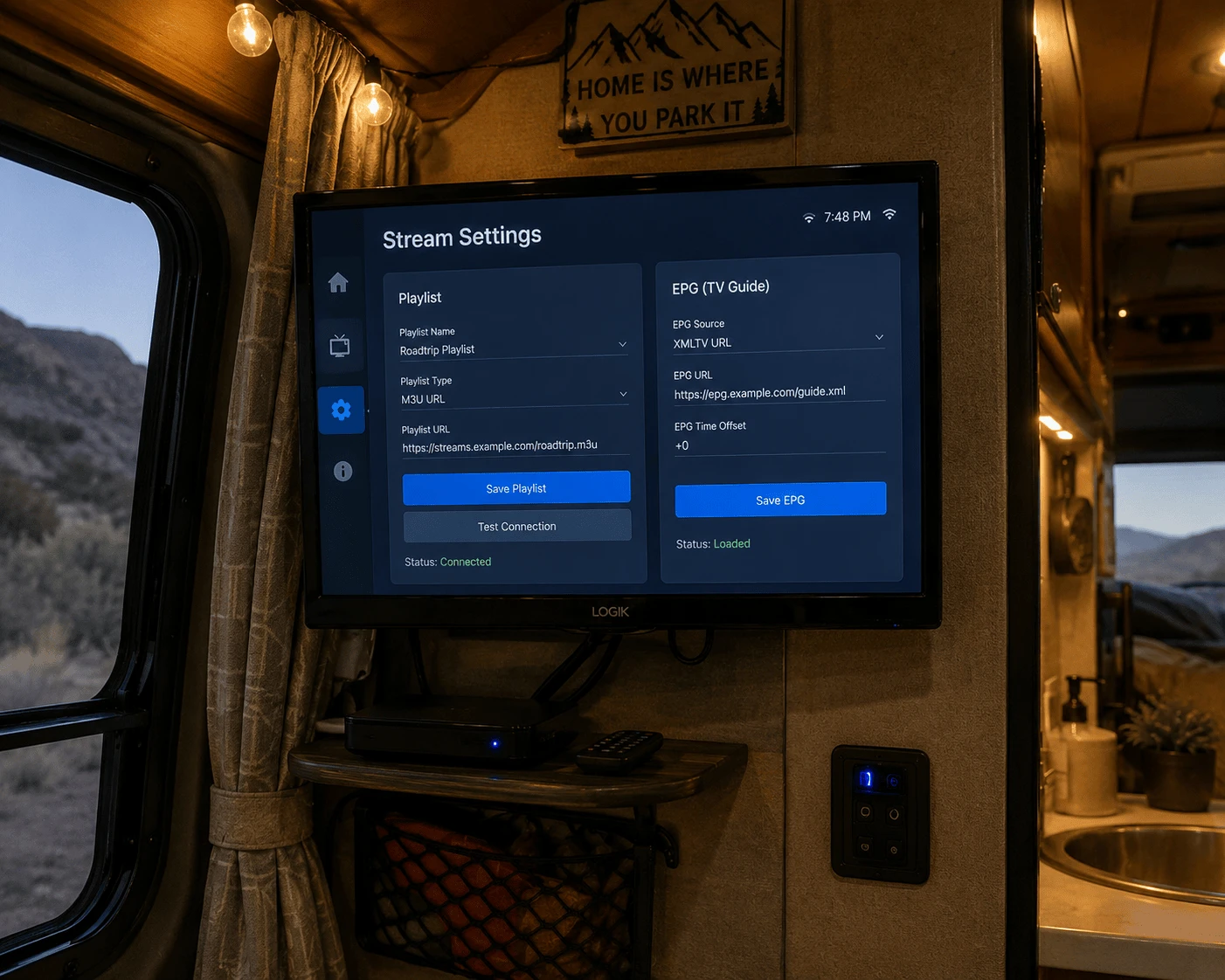
Image: Perfect Player IPTV on an Android TV box, playlist and EPG settings
Is Perfect Player still available in 2026?
Not through official channels. Here's what we found when we checked:
Check
Result
Google Play listing (Niklabs Software)
Page not found in the US, UK, France and Germany
Developer website (niklabs.com)
No longer hosts the app
Latest version
1.6.0.1, released in 2022
Amazon Appstore
Not listed
An app without updates still runs, but it won't get fixes for new Android versions or security issues. That's also why you'll find Perfect Player APKs on random download sites: with no official source left, you can't confirm what you're installing. We don't recommend sideloading it fresh.
How to set up Perfect Player (if it's already installed)
Perfect Player keeps the playlist and the TV guide (EPG) in two separate settings. Most "no guide" problems come from filling in only the first one.
1. Add your playlist
Open Perfect Player and select the Settings gear.
Go to General and select Playlist.
Paste your provider's M3U link and confirm.
Perfect Player works with M3U links. If your provider sent only Xtream details (server URL, username, password), ask for the M3U version of the account — Watchzio includes both in the welcome email. No playlist yet? Start a free 24-hour Watchzio trial — no card required.
2. Add the EPG
Still under Settings → General, select EPG.
Paste your provider's XMLTV address — it's usually a different link from the playlist.
Go back to the channel list and give the guide a few minutes to load the first time.
How to reload the playlist in Perfect Player
Channels changed, or the list looks out of date? Open Settings → General → Playlist, confirm the link again, then fully close and reopen the app so it downloads a fresh copy. Do the same under EPG if the guide is stuck on old programmes. There's no web page for uploading a playlist to Perfect Player — the link is always entered on the box itself.
Does Perfect Player have a recording function?
Recording isn't what Perfect Player was built for. If you want to record live TV on an Android box, TiviMate is the usual choice: recording is part of its Premium features, alongside catch-up where your provider offers it.
Fixing common Perfect Player problems
Channels load but the guide is empty
The EPG address is missing or wrong. Check Settings → General → EPG, paste the XMLTV link again and wait a few minutes.
The playlist won't load
Re-paste the M3U link in full — a missing http:// or a link cut short by an email app is the usual cause. Then confirm your subscription is still active.
The app crashes or freezes on a newer box
That's the cost of an app that stopped being updated. Clear its cache under Settings → Apps on the box; if it keeps crashing, move to a maintained player.
Speeding up a slow Android box
Close apps running in the background, clear the cache of the apps you use, and keep at least a gigabyte of storage free. For the picture itself, an Ethernet cable beats Wi-Fi: HD needs about 10 Mbps and 4K at least 25 Mbps.
What to install instead of Perfect Player
Perfect Player
TiviMate
IBO Player Pro
Still updated
No (last version 2022)
Yes
Yes
Where to get it
No official source
Google Play, per tivimate.com
Developer download (code 481220 on Fire TV)
Login types
M3U link
M3U link or Xtream login
M3U link or Xtream login
Adding the playlist
Typed on the box
Typed on the box
From your phone or laptop at iboproapp.com
Works with Watchzio
Yes
Yes
Yes
If you liked Perfect Player's clean guide, TiviMate on an Android TV box is the closest step up. If you'd rather never type a link with the remote, go with IBO Player Pro — the same website steps work on Android boxes.
The Bottom Line
Perfect Player still works if it's already on your box: add the M3U link under Playlist, the XMLTV link under EPG, and restart to reload. But it's no longer maintained, so for a new setup choose TiviMate or IBO Player Pro. Test either with a free 24-hour Watchzio trial, no credit card, and compare the IPTV subscription plans when you're ready.
Watch on any device — no cable needed
Start your free 24-hour trial. No credit card required.
We could not find it: the Google Play page for Perfect Player returns "not found" in the US, UK, France and Germany, and the developer site no longer hosts the app. The last version is 1.6.0.1 from 2022.
How do I add a playlist to Perfect Player?
Open Settings, go to General → Playlist and paste your provider's M3U link. Then add the XMLTV link separately under General → EPG so the TV guide loads.
How do I reload the playlist in Perfect Player?
Open Settings → General → Playlist, confirm the link again, then fully close and reopen the app. Repeat under EPG if the guide is out of date.
Does Perfect Player support Xtream Codes?
Perfect Player works with M3U playlist links. If your provider sent only Xtream details, ask for the M3U version of your account and paste it as the playlist.
Can Perfect Player record live TV?
Recording is not what Perfect Player was built for. TiviMate is the usual choice for recording on an Android box, as part of its Premium features.
What is the best alternative to Perfect Player?
TiviMate is the closest step up, with a better guide, Xtream logins and recording in Premium. IBO Player Pro suits people who want to add the playlist from their phone at iboproapp.com.
Open an IPTV M3U playlist in VLC on Windows or Mac, turn Xtream login details into a working link, show the channel list and fix 'can't open MRL' errors.
Which IPTV Smarters app is the official one on the App Store, how to install it on iPhone or iPad, add your playlist, AirPlay it to your TV and fix common errors.
Install Kodi on Firestick, add the PVR IPTV Simple Client from the official repository, load your M3U playlist and EPG, and fix the 'ffmpeg missing' and empty-guide errors.